


Work from anywhere, feel like you're in the office
A virtual office teams actually log into.
Log in and your team sees you. Connect only when you want to. No earphones, no always-on audio, no game-like UI. Floor plan, room voice, screen sharing, chat and clock-in/out logs, all in one browser tab.
14-day free trial · No credit card · Monthly or annual billing
- Data stays in Japan. No overseas transfer.
- Browser only. Nothing to install.
- Mic off by default, not always-on spatial audio
- Encrypted in transit and at rest
- Ping / knock: a quick “sumimasen” tap
- ¥980 per user, predictable billing
- 14-day trial · No credit card
- Business floor plan, not a game map
- Guests join with a link. No install.
Trying to run a virtual office? Teams often hit friction like this.
-
Heavy client bogs PCs down, so people just stop opening it
-
“Looks like a game.” Management won’t approve the rollout
-
Always-on proximity audio: headphones all day, exhausting
-
Per-seat bills and minimums bite harder as headcount grows
-
“Got a minute?” becomes Slack ping-pong, or it never gets asked
-
Screen share falls apart; you bail to Zoom mid-call
-
Always-on mic: your home noise becomes everyone’s background
-
Huge floor plan, and it still takes forever to find the right person
-
Setup fees and long contracts. No real pilot before you pay.
Skip that pile-up: light browser, business UI, on-demand voice, clear pricing, easy trial.
Four steps. Then it just runs.
-
Create your account
Thirty seconds. Just your email. No sales call, no onboarding meeting, no demo required.
-
Set up your space
Name your floor. Arrange your rooms. Two minutes to a layout that actually looks like where your team works.
-
Invite your team
Send a link. They open a browser. No install on their end, no account required to join as a guest.
-
Just show up
Log in. Your seat lights up. The team sees you. That's the whole thing.
Why Zaseki
Keep your team chat where it is for threads and files. Zaseki handles exactly one thing those tools don't: knowing who's there, and talking when you need to.
-
Not a game
No pixel art. No walking avatars. A flat floor plan, real photos. Something you can show management and they won't ask you to explain it.
-
Runs on what you already have
Browser only. Nothing to install. Runs fine on the aging Windows PC nobody's replaced since 2019.
-
Presence without surveillance
Audio isn't ambient or always-on. You ping someone with a quick “excuse me”; they get a knock-style notification. Your mic isn't live for the room just because you're logged in.
-
Predictable pricing
¥980 per user. That's it. No space-based pricing, no room limits. The invoice at the end of the month looks exactly like you expected.
What you need. When you need it.
-
Presence that works
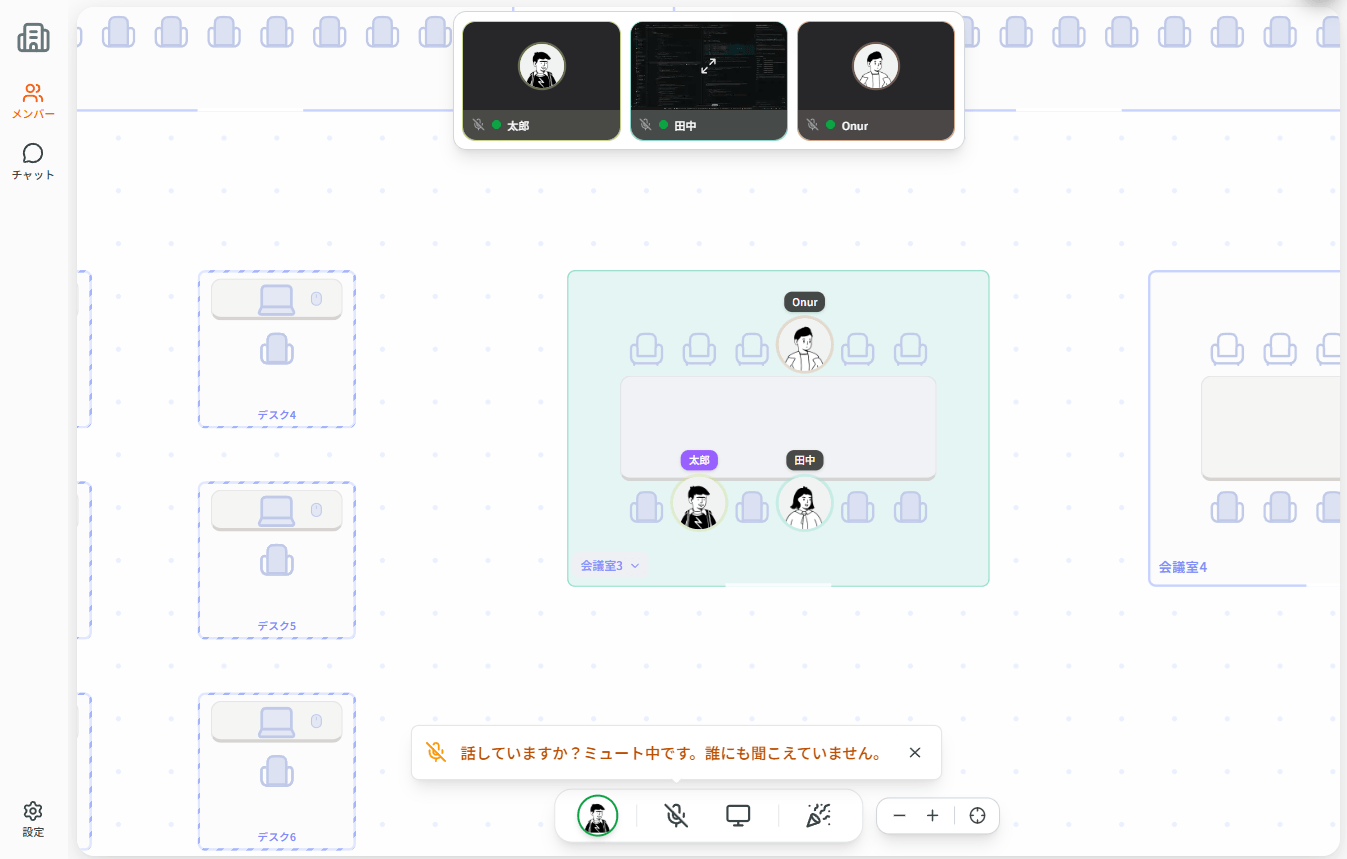
At a glance on the floor plan, see who's in, who stepped away, and who's heads-down. Update status manually when your availability changes. You stop sending "are you there?" messages.
-
One-click voice, no link required
"Got a minute?" is a click. Send a ping; they get a knock-style notification. Voice is for meeting rooms or when you intentionally connect, not an open mic all day. No Zoom link, no calendar invite, no waiting room, no "can you hear me?"
-
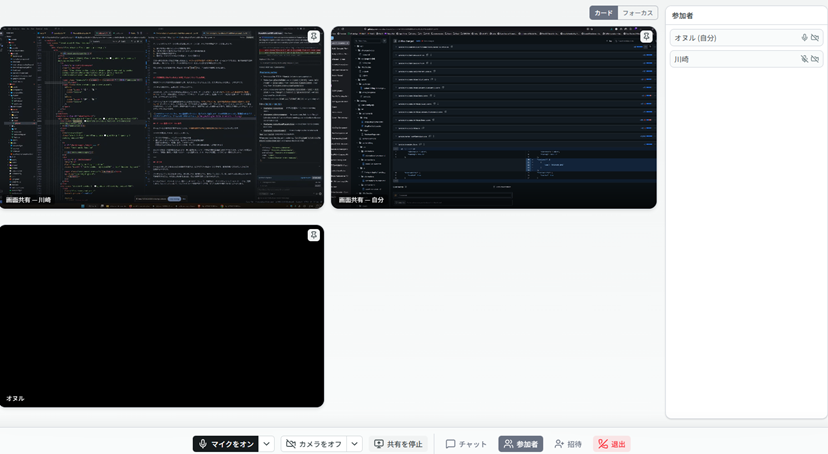
Screen share without switching apps
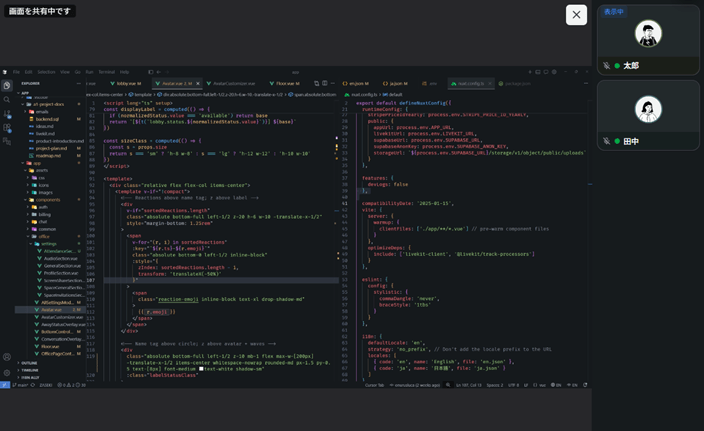
Share your screen inside the same conversation. No switching to Zoom halfway through. Share multiple screens at once: one for the code, one for the browser.
-
Move like a real office
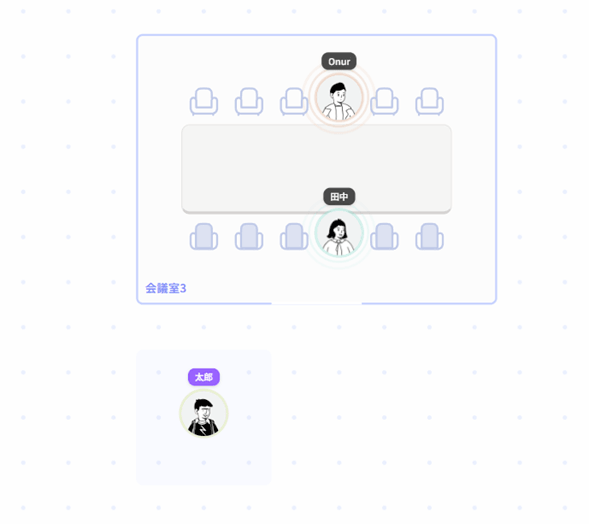
Move between rooms the way you'd walk to a meeting room. The floor plan always shows where everyone is. When the call ends, go back to your desk.
-
Async that fits the moment
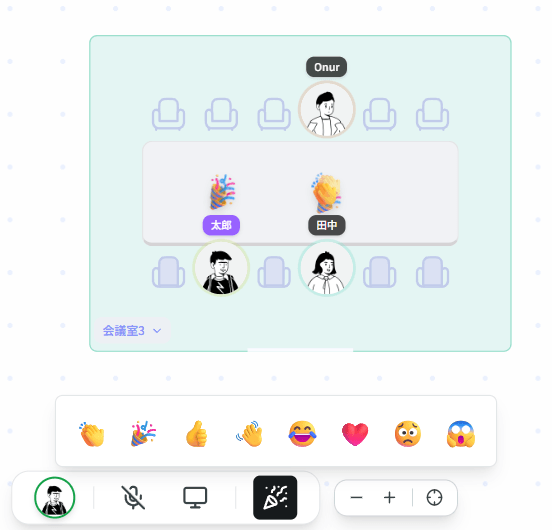
Not every question needs a voice call. Chat for the smaller things. React and move on. The thread stays in the room so nothing gets lost.
-
Guests without accounts
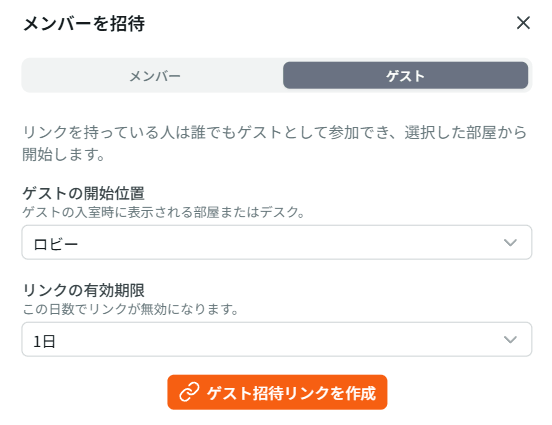
Invite a client or contractor with a link. No account needed on their end.
-
Video meeting rooms
When you need real video (not just a quick ping), spin up a dedicated browser-based room for client calls, vendor reviews, or any session where cameras matter. Create a meeting and share the link. Same Zaseki workspace; you only open a formal video session when the moment calls for it, without juggling a separate conferencing stack.
-
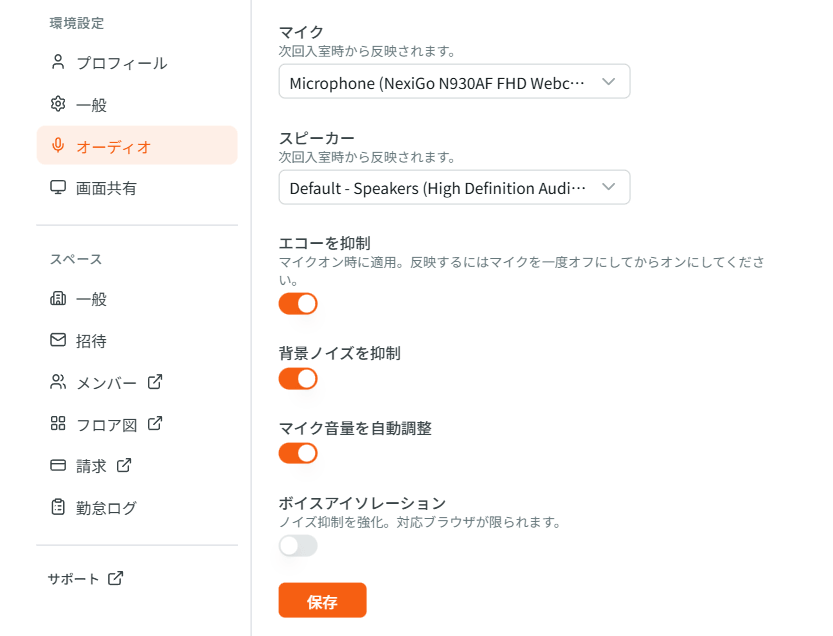
Noise suppression & echo cancellation
High-grade noise suppression and echo cancellation built into the call path. From a café or a busy home, the other person hears your voice clearly, not the room around you.
Also included
- Floor editor: desks, rooms, and labels for real work.
- Knock/ping someone without booking a meeting.
- In-call: multi-monitor share, hand raise, and reactions.
- Room chat and join/leave pings for who is around.
- CSV exports for clock-in/out and internal paperwork.
- Guests join via link—no new account.
- Remote-only, office-first, or mixed: same floor workflow.
Comparison
Lightweight in the browser, presence on a floor plan, ping/knock attention instead of always-on proximity audio, pricing that's easy to read. That's where we're stronger.
| Criteria | Zaseki | oVice | MetaLife | roundz | FAMoffice | VoicePing | VOICHAT | Gather |
|---|---|---|---|---|---|---|---|---|
| Production-ready UI in Japanese | Yes | Yes | Yes | Yes | Yes | Yes | Yes | Partial |
| Seat / floor plan shows who's around at a glance | Yes | Yes | Yes | - | Yes | Partial | Partial | Yes |
| Ping / knock notifications (no always-on proximity audio while logged in) | Yes | Yes | Yes | Yes | Yes | Yes | Yes | Partial |
| Lightweight, browser-first experience | Yes | Partial | Partial | - | Partial | Partial (app available) | Partial (browser + apps; list-style map) | Partial |
| Business-appropriate look (not RPG / game-style) | Yes | Yes | - | Yes | Yes | Yes | Yes | Partial |
| Clean floor — easy to see who’s where (minimal wallpaper / illustration clutter) | Yes | Partial | - | - | Partial | Partial | Partial | - |
| Pricing is easy to read and split across the team | Yes | Yes | Partial | Partial | - | Partial | Yes | Yes |
| Free tier or low-friction trial | Yes | Yes | Yes | Partial | Partial | Yes (up to 5 free) | Yes (3 seats free + 14-day trial; FAQ also mentions 30 days) | Partial |
| Persistent team chat (channels / DMs, not only during a call) | Yes | Yes | Yes | Partial | Yes | Partial | Partial (one-time posts; no channels or DMs) | Yes |
| Guests can join without creating an account | Yes | Partial | Partial | Partial | Partial | Partial | - | Yes |
| Drag-and-drop floor plan editor | Yes | Partial | Partial | - | Partial | - | - | Yes |
| Voice-first experience; camera off by default | Yes | Partial | Partial | Yes | Partial | Yes | Yes | Partial |
| Customer data stored in Japan. No overseas transfer. | Yes | Yes | Partial | ? | Yes | Partial | ? | - |
| No large minimum seat block or setup fee to get started | Yes | Yes | Partial | Partial | - | Yes | Yes | Partial |
| Setup fee | None | None | None | None | ¥100,000 | None | None | None |
| Est. monthly (10-person team) | ¥5,880 | ¥7,315–8,778/mo (Entry-S, tax incl.; annual vs monthly) | ¥19,800 | ≈¥27,500/mo (Basic plan example) | ¥30,000/mo (tax excl.; 100-ID block) | ¥6,325–7,500/mo (Small plan; annual vs prior flat rate) | ¥7,700 (annual Standard, 10 seats) | ≈¥18,000–22,500/mo (Gather 2.0 Essential; annual vs monthly) |
Legend: Yes = applies · Partial = limited or conditional · - = not applicable or weak on this axis · ? = not enough public data on this axis
Vendor terms change. Confirm on their site before you buy.
Monthly estimate
Standard: headcount × ¥980/mo (excl. tax). Trial: up to 4 seats for 14 days, no card. No space-based tiers.
¥980
per user / month · excl. tax
Monthly examples below, excl. tax. Annual pricing is on the pricing page.
| Team size | About / month (excl. tax) |
|---|---|
| 5 people | ¥4,900 |
| 10 people | ¥9,800 |
| 20 people | ¥19,600 |
| 30 people | ¥29,400 |
- 14-day trial, no card
- Annual billing · 2 months free
Invoice payment (bank transfer) available · No minimum contract period
Built for business. Not an afterthought.
Security isn't a checkbox we added later. It's how the product is built.
-
Data stays in Japan
All customer data is stored on servers in Japan. We do not transfer it overseas.
-
Encrypted in transit and at rest
Encrypted in transit and at rest. Built to meet business-grade security requirements.
-
Sign-in and session-backed access
HTTPS in production. Features are available only to authenticated users as designed.
-
Workspace-aware data paths
Membership is enforced in the product and backed by database-level access controls so people only reach data intended for their organization.
-
You control when you're live
No always-on audio. No background recording. Your voice only travels when you deliberately join voice; logging in alone does not broadcast you.
-
No install, no IT burden
Nothing to install on employee devices. Runs in the browser your IT team already approves. Minimal endpoint risk.
A good fit for
SMEs and teams of about 4–100 people: pilots, professional firms, multi-site groups, and division rollouts.
-
Pilot or small squad / ~4–10 people
Hybrid days don’t line up; chat doesn’t show who’s actually at their desk.
→ The seating chart shows who’s on: fewer DMs, easy to trial in one team.
-
Tax, legal, or labor consulting / ~15–25 people
Client work and internal tasks mix; without a signal, people ping seniors or wait on replies.
→ Floor-plan status shows availability before people interrupt.
-
HQ + branches or back office / ~40–65 people
Tokyo, regions, and telework together, but meeting tools still don’t show desk presence.
→ Faster cross-site coordination without living in the calendar.
-
Division or group-company unit / up to ~100 people
HR needs telework records after the 2025 childcare / caregiver rules; a heavier virtual office already stalled once.
→ Business-neutral map for leadership and audits, plus CSV logs for internal paperwork.
For internal approval & evaluation
Download a free PDF covering Zaseki's overview, pricing, and security, ready to share with your manager or procurement team.
Includes: Overview / Pricing / Comparison / Security / Getting started
Common questions
How is this different from team chat tools?
Zaseki isn't a messaging tool. It visualizes who's present right now, and connects voice instantly without a meeting link. Keep using your existing chat for threads and files.
How is it different from oVice or MetaLife?
Lighter. No game aesthetic. No assumption of all-day audio. Per-user flat pricing without space-based tiers. That's the short version.
Does it work on older hardware?
Yes. It runs in a browser. No install, no GPU, no 16GB RAM required.
Is audio always on?
No. Logging in doesn't open your microphone. Voice runs in meeting rooms, via meet links, or after you intentionally connect, plus a ping/knock to get someone's attention. It is not always-on proximity audio.
Do team members need to install anything?
Nothing. They open a browser link. Guests don't even need an account.
Is there a free trial?
Yes. Every workspace starts with a 14-day free trial with full features (no credit card required). When it ends, choose a plan on the pricing page. We offer both monthly and annual billing (annual includes two months free).
Do you offer annual billing?
Yes. You can choose monthly or annual billing. Annual billing includes two months free compared to paying month-by-month; see the pricing page for details.
Can we pay by invoice?
Yes. Paid plans support invoice billing.
Where is data stored?
In Japan only, on our infrastructure there. No overseas transfer.
Can we use the IT introduction subsidy (including digitalization / AI programs)?
As we plan to incorporate, we are evaluating alignment with public support programs—including paths relevant to the IT introduction subsidy and similar schemes. Any use depends on each program’s listing and your project meeting its published requirements. Subsidy rates and eligible costs differ by program and fiscal year. Contact us and check the latest official guidelines.
Can this help with the 2025 childcare law compliance?
We plan to deepen presence and work-record capabilities for telework under amended childcare and family-care leave rules. Today, login and logout records already serve as objective telework logs, with CSV export for internal paperwork.
Can accounting and professional firms use it?
Yes. It supports presence, intentional voice (not always-on) for client-facing work, and telework-style logs suited to tax, accounting, and social-labor practices.
Can we use it without a corporation?
Yes. Sole proprietors and freelance teams are welcome.
Make Zaseki your reason to switch to remote work.
No heavy client. No all-day headset. No convincing your manager it's not a video game. Log in. Your seat lights up. Click to talk. That's the whole pitch.
14-day free trial · No credit card · Monthly or annual billing