What is a virtual office (software)? How it works and how it relates to the metaverse
A plain-language guide to remote “virtual office” products: the two meanings of the term, presence, maps, real-time sync, voice models, and overlap with metaverse wording.
This article explains virtual office software for distributed work: what the category is trying to represent, how pieces fit together, and how the word metaverse gets attached. It is meant as a neutral map of the idea, not a pitch for any vendor.
The name collision: two different “virtual offices”
English has the same confusion Japanese has, just with different default examples.
- Mail forwarding / business address services (sometimes called a virtual office in the coworking industry). The product is a physical address operation, not a live map of where teammates are.
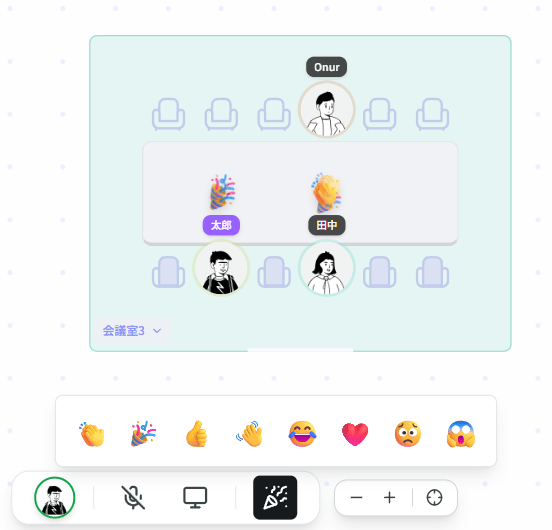
- Software that models a workplace online: floors, rooms, desks, presence, and often chat or voice.
Everything below means (2). If you are researching tools, add keywords like remote, hybrid, presence, or spatial so search results do not drown in mailbox providers.

What the software is actually doing
In one sentence: it ships a shared notion of place and availability, so a distributed team can answer questions a real office answers by sight: who is around, where they are in the layout, and what state they are in (available, focused, in a meeting, away).
Chat apps show an icon color. That color is a weak proxy for interruptibility. Virtual office UIs try to restore a thicker signal by binding people to tiles, desks, or rooms on a map. The idea predates the pandemic, but demand spiked when hybrid work became ordinary.
Decomposing a typical product
Names differ by vendor, but architectures rhyme.
Identity and access
Who may enter a space, roles (admin vs member), and whether the space is closed to a company domain. Most products assume workplace identity (invite by email, SSO, etc.).
Presence
States like online, away, focus, lunch, in meeting. Implementation varies: client heartbeats, manual toggles, calendar hooks, or mixes. If presence is stale, the map becomes decoration.
Space model
Logical structure: floors, zones, desks, booths, meeting rooms. Presentation often falls into a few patterns:
- Flat floor plan / seating chart: 2D layout with labels; you click a desk or pick from a list; no walking simulation.
- Top-down 2D with avatars: move a character on a drawn floor; some products tie proximity to who you hear.
- 3D or VR: higher immersion, higher hardware and onboarding cost for daily work.
Same category, very different cognitive load and muscle memory.
Real-time synchronization
Everyone should see moves and status changes with low delay. Common patterns: WebSockets or similar long-lived connections, sometimes with polling fallbacks. High latency feels like ghost presence (people already left but the map lags).
Communication layer
Chat (channels / DMs), voice, screen share. Voice often rides on WebRTC (peer paths or media servers depending on product). The important split for users is not the acronym but when the microphone is live:
- Explicit connect: you press talk, knock, join a room, or accept a request. Easier to separate “I am here” from “you can hear me”.
- Space-bound audio: same room or distance rules control what you hear; can resemble an open office, and can edge toward always-hot setups if not designed carefully.
Logs and exports (optional)
Some teams export presence or room history for telework documentation. What is stored, for how long, and who can read it is policy and product specific (and touches privacy and labor norms in your country).
Metaverse vocabulary: overlap without equality
Metaverse started as a broad vision of persistent virtual worlds. In B2B marketing it often means any shared digital space, sometimes with avatars, sometimes for events, sometimes as a buzzword.
A seating-chart style virtual office may avoid the word entirely: the UI reads like facilities or HR signage, not a game world. A useful hack is to ignore the label and compare representation of space, presence fidelity, and audio rules. Those three explain user experience more reliably than “metaverse yes/no.”
Relation to Slack, Teams, and meeting links
Slack-class tools optimize threads, search, and notifications. Virtual office products often optimize spatial context and lightweight sync, then attach chat or calls. Convergence is real: platforms borrow features. In practice you may run chat in one place and a presence map elsewhere, or use a product that bundles both. The category border is fuzzy, not a law.
Typical deployment shape
Spaces are usually per team or department, commonly discussed in the roughly five to fifty people range for one floor, rather than as a whole-company ERP. Clients range from browser-only to heavy native apps; VPN, proxies, and old GPUs matter more for 3D than for flat maps.
Privacy and security: what reviewers usually read for
Cross-vendor themes (details always live in vendor docs and contracts):
- When audio/video flows, to whom, and through which servers (end-to-end encryption claims, if any, vary)
- Retention for presence and chat
- Data region and subprocessors
This section is only a topic list, not advice for a specific org.
Closing
Virtual office software is a family of tools that model place and availability for remote or hybrid teams, then hang communication on that model. The same category spans quiet seating-chart UIs and walkable maps with spatial audio. Metaverse may or may not appear on the tin; the behavior you want to understand is how presence is represented and how the mic turns on.
When you open a demo, two quick questions cut through marketing: after login, is the mic live by default? and does the map encode real state changes, or only decoration? Those answers tell you which branch of the category you are looking at.